---
title: Creating a Simple Job Board in Craft CMS
date: 2019-10-16T13:33:00-04:00
author: cc_admin
canonical_url: "https://caffeinecreations.ca/blog/creating-a-simple-job-board-in-craft-cms/"
section: Blog
---

![Job board hero](https://caffeinecreations.ca/uploads/hero/_1920x660_crop_center-center_none_ns/job-board-hero.jpg)

- [Code](https://caffeinecreations.ca/blog/category/code/), [Tutorial](https://caffeinecreations.ca/blog/category/code/tutorial/), [CraftCMS](https://caffeinecreations.ca/blog/category/craftcms/)

# Creating a Simple Job Board in Craft CMS

In this post I will show you how to create a simple job board for a medium to large sized company. Jobs are available internally for 5 days first and then move to public listing. Additionally the jobs will have keyword filtering that updates the listing as you type.

This site that this job board was originally built for had branches located across Canada. Requirements included listing all positions across Canada, linking to the branch the job is located at, and the ability to filter all job listings in order to make it easier to find a job that is right for the visitor.

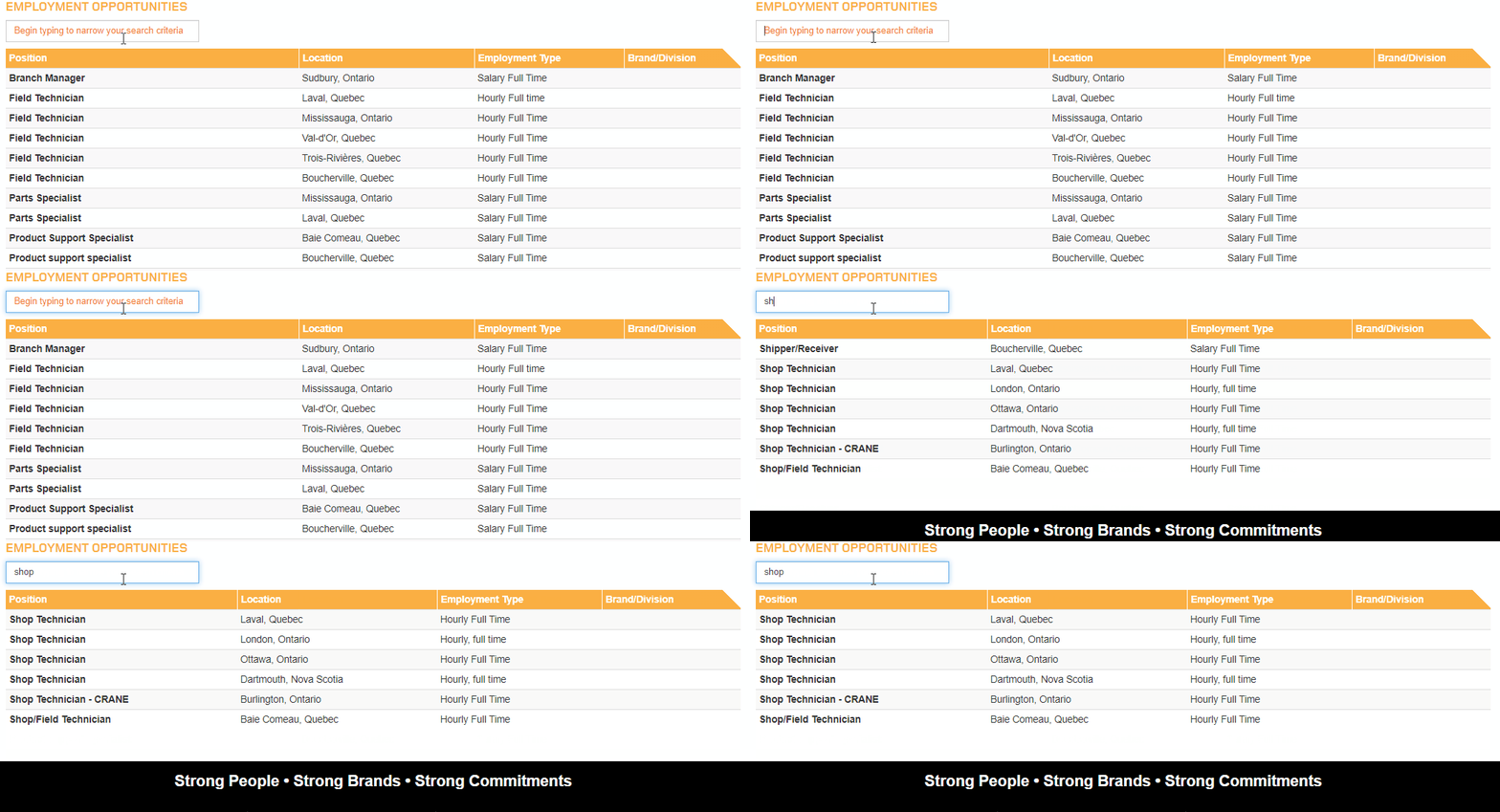
The job board that I built is a simple listing in a table with columns for *position, location, employment type,* and *Brand/Division*. The position links off to an entry page and the location links off to the branch that the job opening is located at.

Above the list is an input field where you can filter the listing by typing into it.
![](https://caffeinecreations.ca/uploads/job-filter.gif)

#### Section and Field Settings

Each job opportunity has fields for:

- Title
- Branch (entries field)
- Location Title (input for unique branch name on this page)
- Brand/Division (input field)
- Employment Type (input field)
- Copy (redactor)

Set up the careers section and point the entries to the `careers/_entry template`.

The next step is to set up a route so that we can have internal job entries viewable on at a url that is only available if you know the link. Go to the routes setting and add a route like this `internal/careers/slug` and have it point to the `careers/_entry` template as well.

### Public Listing Template

This is the code for the public careers listing template where job opportunities that are more than 5 days old will display.

```
<button class="absolute z-10 flex items-center justify-center w-8 h-8 -translate-y-1/2  -right-4 -top-4" clipboard="" title="Copy to Clipboard" to="" type="button" x-clipboard.raw="<h3>Employment Opportunities</h3>

          <input type="search" class="light-table-filter form-control input-md" data-table="order-table" placeholder="{{ "careers_filter"|t}}">

          <table class="table table-striped table-condensed order-table">
            <thead>
              <tr>
                <th>Position</th>
                <th>Location</th>
                <th>Employment Type</th>
                <th>Brand/Division</th>
              </tr>
            </thead>

            <tbody>

              {# show only entries more than 5 days old #}
              {% set dateRestriction = now|date_modify('5:00 -5 days') %}
              {% set postDateParam = '< ' ~ dateRestriction|date('U') %}

              {% for entry in craft.entries.section('careers').orderBy('title').postDate(postDateParam).all() %}
                <tr>
                  <td><strong><a href="{{ entry.url }}">{{ entry.title }}</a></strong></td>

                  {% set branch = entry.branch.one() ?? null %}

                  <td>
                  {% if branch|length %}<a href="{{ branch.url }}" class="branch-link">{{ entry.location }}</a>
                  {% else %}
                    {{ entry.location }}
                  {% endif %}
                  </td>
                  <td>{{ entry.division }}</td>
                  <td>{{ entry.brandDivision }}</td>

                </tr>
              {% endfor %}

            </tbody>

          </table>" x-data="">
	<svg class="h-5 w-5" viewbox="0 0 64 64" xml:space="preserve" xmlns="http://www.w3.org/2000/svg">
  <rect fill="#f3f4f6" height="53" rx="3" width="41" x="7" y="2"></rect>
  <rect fill="#f3f4f6" height="51" rx="3" width="39" x="19" y="11"></rect>
  <path d="M53.98 9.143h-3.97c-.082 0-.155.028-.232.047V5.023C49.778 2.253 47.473 0 44.64 0H10.217C7.384 0 5.08 2.253 5.08 5.023v46.843c0 2.77 2.305 5.023 5.138 5.023h6.037v2.268c0 2.67 2.216 4.843 4.941 4.843H53.98c2.725 0 4.942-2.173 4.942-4.843v-45.17c0-2.671-2.217-4.844-4.942-4.844zM7.11 51.866V5.023c0-1.649 1.394-2.991 3.106-2.991H44.64c1.712 0 3.106 1.342 3.106 2.99v46.844c0 1.649-1.394 2.991-3.106 2.991H10.217c-1.712 0-3.106-1.342-3.106-2.99zm49.778 7.29c0 1.551-1.306 2.812-2.91 2.812H21.195c-1.604 0-2.91-1.26-2.91-2.811v-2.268H44.64c2.833 0 5.138-2.253 5.138-5.023V11.128c.077.018.15.047.233.047h3.968c1.604 0 2.91 1.26 2.91 2.811v45.17z"></path>
  <path d="M38.603 13.206H16.254a1.015 1.015 0 1 0 0 2.032h22.35a1.015 1.015 0 1 0 0-2.032zM38.603 21.333H16.254a1.015 1.015 0 1 0 0 2.032h22.35a1.015 1.015 0 1 0 0-2.032zM38.603 29.46H16.254a1.015 1.015 0 1 0 0 2.032h22.35a1.015 1.015 0 1 0 0-2.032zM28.444 37.587h-12.19a1.015 1.015 0 1 0 0 2.032h12.19a1.015 1.015 0 1 0 0-2.032z"></path>
</svg>
<div class="sr-only">Copy to clipboard</div></button>```twig
<h3>Employment Opportunities</h3>

          <input type="search" class="light-table-filter form-control input-md" data-table="order-table" placeholder="{{ "careers_filter"|t}}">

          <table class="table table-striped table-condensed order-table">
            <thead>
              <tr>
                <th>Position</th>
                <th>Location</th>
                <th>Employment Type</th>
                <th>Brand/Division</th>
              </tr>
            </thead>

            <tbody>

              {# show only entries more than 5 days old #}
              {% set dateRestriction = now|date_modify('5:00 -5 days') %}
              {% set postDateParam = '< ' ~ dateRestriction|date('U') %}

              {% for entry in craft.entries.section('careers').orderBy('title').postDate(postDateParam).all() %}
                <tr>
                  <td><strong><a href="{{ entry.url }}">{{ entry.title }}</a></strong></td>

                  {% set branch = entry.branch.one() ?? null %}

                  <td>
                  {% if branch|length %}<a href="{{ branch.url }}" class="branch-link">{{ entry.location }}</a>
                  {% else %}
                    {{ entry.location }}
                  {% endif %}
                  </td>
                  <td>{{ entry.division }}</td>
                  <td>{{ entry.brandDivision }}</td>

                </tr>
              {% endfor %}

            </tbody>

          </table>
```
```

#### Filter the Entries

Now that we have all the entries displaying it's time to enable filtering. I cribbed the javascript from this [Code Pen](https://codepen.io/chriscoyier/pen/tIuBL). Add this to your template. Since it's only needed on this template and the private job board I've added it to a `{% block pageJavascript %} {% endblock %}` block which gets rendered via the layout template.

```
<button class="absolute z-10 flex items-center justify-center w-8 h-8 -translate-y-1/2  -right-4 -top-4" clipboard="" title="Copy to Clipboard" to="" type="button" x-clipboard.raw="<script>
    (function (document) {
      'use strict';

      var LightTableFilter = (function (Arr) {

        var _input;

        function _onInputEvent(e) {
          _input = e.target;
          var tables = document.getElementsByClassName(_input.getAttribute('data-table'));
          Arr.forEach.call(tables, function (table) {
            Arr.forEach.call(table.tBodies, function (tbody) {
              Arr.forEach.call(tbody.rows, _filter);
            });
          });
        }

        function _filter(row) {
          var text = row.textContent.toLowerCase(), val = _input.value.toLowerCase();
          row.style.display = text.indexOf(val) === -1 ? 'none' : 'table-row';
        }

        return {
          init: function () {
            var inputs = document.getElementsByClassName('light-table-filter');
            Arr.forEach.call(inputs, function (input) {
              input.oninput = _onInputEvent;
            });
          }
        };
      })(Array.prototype);

      document.addEventListener('readystatechange', function () {
        if (document.readyState === 'complete') {
          LightTableFilter.init();
        }
      });

    })(document);  
  </script>" x-data="">
	<svg class="h-5 w-5" viewbox="0 0 64 64" xml:space="preserve" xmlns="http://www.w3.org/2000/svg">
  <rect fill="#f3f4f6" height="53" rx="3" width="41" x="7" y="2"></rect>
  <rect fill="#f3f4f6" height="51" rx="3" width="39" x="19" y="11"></rect>
  <path d="M53.98 9.143h-3.97c-.082 0-.155.028-.232.047V5.023C49.778 2.253 47.473 0 44.64 0H10.217C7.384 0 5.08 2.253 5.08 5.023v46.843c0 2.77 2.305 5.023 5.138 5.023h6.037v2.268c0 2.67 2.216 4.843 4.941 4.843H53.98c2.725 0 4.942-2.173 4.942-4.843v-45.17c0-2.671-2.217-4.844-4.942-4.844zM7.11 51.866V5.023c0-1.649 1.394-2.991 3.106-2.991H44.64c1.712 0 3.106 1.342 3.106 2.99v46.844c0 1.649-1.394 2.991-3.106 2.991H10.217c-1.712 0-3.106-1.342-3.106-2.99zm49.778 7.29c0 1.551-1.306 2.812-2.91 2.812H21.195c-1.604 0-2.91-1.26-2.91-2.811v-2.268H44.64c2.833 0 5.138-2.253 5.138-5.023V11.128c.077.018.15.047.233.047h3.968c1.604 0 2.91 1.26 2.91 2.811v45.17z"></path>
  <path d="M38.603 13.206H16.254a1.015 1.015 0 1 0 0 2.032h22.35a1.015 1.015 0 1 0 0-2.032zM38.603 21.333H16.254a1.015 1.015 0 1 0 0 2.032h22.35a1.015 1.015 0 1 0 0-2.032zM38.603 29.46H16.254a1.015 1.015 0 1 0 0 2.032h22.35a1.015 1.015 0 1 0 0-2.032zM28.444 37.587h-12.19a1.015 1.015 0 1 0 0 2.032h12.19a1.015 1.015 0 1 0 0-2.032z"></path>
</svg>
<div class="sr-only">Copy to clipboard</div></button>```html
<script>
    (function (document) {
      'use strict';

      var LightTableFilter = (function (Arr) {

        var _input;

        function _onInputEvent(e) {
          _input = e.target;
          var tables = document.getElementsByClassName(_input.getAttribute('data-table'));
          Arr.forEach.call(tables, function (table) {
            Arr.forEach.call(table.tBodies, function (tbody) {
              Arr.forEach.call(tbody.rows, _filter);
            });
          });
        }

        function _filter(row) {
          var text = row.textContent.toLowerCase(), val = _input.value.toLowerCase();
          row.style.display = text.indexOf(val) === -1 ? 'none' : 'table-row';
        }

        return {
          init: function () {
            var inputs = document.getElementsByClassName('light-table-filter');
            Arr.forEach.call(inputs, function (input) {
              input.oninput = _onInputEvent;
            });
          }
        };
      })(Array.prototype);

      document.addEventListener('readystatechange', function () {
        if (document.readyState === 'complete') {
          LightTableFilter.init();
        }
      });

    })(document);  
  </script>
```
```

#### Internal Job Listing

One client requirement was to have job listings available internally for 5 days before they are then available for anyone to apply.

To do this set up a save the above template as a new template at careers/\_internal. At this point it works exactly like the other template. To list only entries that are less than 5 days old change this line `{% set postDateParam = '< ' ~ dateRestriction|date('U') %}` to this: `{% set postDateParam = '> ' ~ dateRestriction|date('U') %}` notice the angle bracket has changed direction.

Now the internal page only lists entries that are new and not available to the public.

**Important:** be sure to disable search engines from indexing the internal template and also remove the urls from any sitemaps.

## Related Articles

[![Importing Entries into a Multi Lingual Craft CMS Website Thumbnail](https://caffeinecreations.ca/uploads/blog/_680x320_crop_center-center_65_none_ns/import-export.jpg)### Importing Entries into a Multi Lingual Craft CMS Website](https://caffeinecreations.ca/blog/importing-entries-into-a-multi-lingual-craft-cms-website/)

[![Language Switcher for Craft 3 Thumbnail](https://caffeinecreations.ca/uploads/hero/_680x320_crop_center-center_65_none_ns/flags.jpg)### Language Switcher for Craft 3](https://caffeinecreations.ca/blog/language-switcher-for-craft-3/)

[![SVG Sprites and Twig Macros in Craft CMS Thumbnail](https://caffeinecreations.ca/uploads/hero/_680x320_crop_center-center_65_none_ns/rainbow-stones.jpg)### SVG Sprites and Twig Macros in Craft CMS](https://caffeinecreations.ca/blog/svg-sprites-and-twig-macros-in-craft-cms/)