---
title: Grouping Entries by First Letter of Last Name
date: 2019-11-22T14:40:00-05:00
author: cc_admin
canonical_url: "https://caffeinecreations.ca/blog/grouping-entries-by-first-letter-of-last-name/"
section: Blog
---
![Alphabet](https://caffeinecreations.ca/uploads/blog/_1920x660_crop_center-center_none_ns/alphabet.jpg)

- [Code](https://caffeinecreations.ca/blog/category/code/), [CraftCMS](https://caffeinecreations.ca/blog/category/craftcms/), [Craft Tips](https://caffeinecreations.ca/blog/category/craftcms/craft-tips/)

# Grouping Entries by First Letter of Last Name

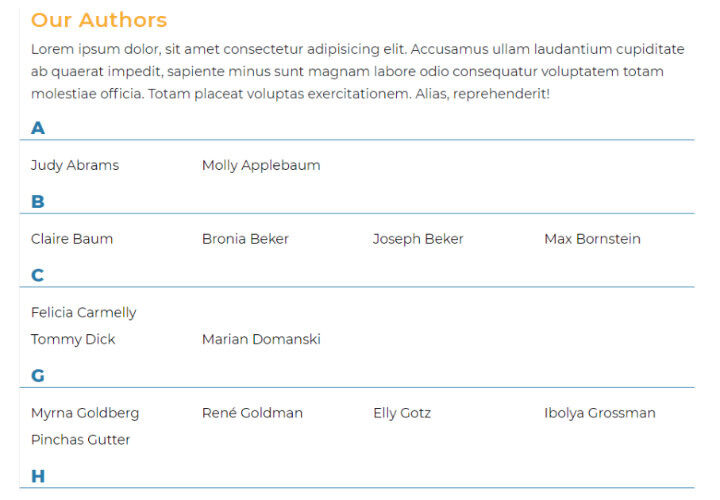
A tutorial on how to group entries by the first letter of a field value in Craft CMS. In this example we'll be ordering a list of book authors by their last name with a header for each letter of the alphabet with results.

I'm working on a site where there are a large number of authors with books listed on the sites. The goal is to list all the authors alphabetically by last name with a header above each letter.

The end result will look like this:
![Alpha author](https://caffeinecreations.ca/uploads/blog/_960xAUTO_fit_center-center_none_ns/alpha-author.jpg)

In order to do this we need to use the [group filter](https://docs.craftcms.com/v3/dev/filters.html#group). We do this by first getting all the entries. The channel I have is called `authors` and has fields for `firstName` and `lastName`.

After getting the entries, group them with the `| group` filter and then finally loop through all the entries outputting entries grouped alphabetically by first letter of last name.

```
<button class="absolute z-10 flex items-center justify-center w-8 h-8 -translate-y-1/2  -right-4 -top-4" clipboard="" title="Copy to Clipboard" to="" type="button" x-clipboard.raw="{# get all the entries #}
  {% set allEntries = craft.entries.section('authors').orderBy('lastName asc, firstName asc').all() %}

{# 
  // group all entries  by first letter of last name 
  // https://docs.craftcms.com/v3/dev/filters.html#group 
#}
  {% set allEntriesByGroup = allEntries | group('lastName[:1]') %}

{# loop through the entries #}
  {% for firstLetter, entriesInGroup in allEntriesByGroup %}
      {# display the Letter #}
      <h2>{{ firstLetter }}</h2>

      {# display the authors for this letter #}
      <ul>
      {% for entry in entriesInGroup %}
        <li>
          <a href="{{ entry.url }}">{{ entry.title }}</a>
        </li>
      {% endfor %}
      </ul>
  {% endfor %}" x-data="">
	<svg class="h-5 w-5" viewbox="0 0 64 64" xml:space="preserve" xmlns="http://www.w3.org/2000/svg">
  <rect fill="#f3f4f6" height="53" rx="3" width="41" x="7" y="2"></rect>
  <rect fill="#f3f4f6" height="51" rx="3" width="39" x="19" y="11"></rect>
  <path d="M53.98 9.143h-3.97c-.082 0-.155.028-.232.047V5.023C49.778 2.253 47.473 0 44.64 0H10.217C7.384 0 5.08 2.253 5.08 5.023v46.843c0 2.77 2.305 5.023 5.138 5.023h6.037v2.268c0 2.67 2.216 4.843 4.941 4.843H53.98c2.725 0 4.942-2.173 4.942-4.843v-45.17c0-2.671-2.217-4.844-4.942-4.844zM7.11 51.866V5.023c0-1.649 1.394-2.991 3.106-2.991H44.64c1.712 0 3.106 1.342 3.106 2.99v46.844c0 1.649-1.394 2.991-3.106 2.991H10.217c-1.712 0-3.106-1.342-3.106-2.99zm49.778 7.29c0 1.551-1.306 2.812-2.91 2.812H21.195c-1.604 0-2.91-1.26-2.91-2.811v-2.268H44.64c2.833 0 5.138-2.253 5.138-5.023V11.128c.077.018.15.047.233.047h3.968c1.604 0 2.91 1.26 2.91 2.811v45.17z"></path>
  <path d="M38.603 13.206H16.254a1.015 1.015 0 1 0 0 2.032h22.35a1.015 1.015 0 1 0 0-2.032zM38.603 21.333H16.254a1.015 1.015 0 1 0 0 2.032h22.35a1.015 1.015 0 1 0 0-2.032zM38.603 29.46H16.254a1.015 1.015 0 1 0 0 2.032h22.35a1.015 1.015 0 1 0 0-2.032zM28.444 37.587h-12.19a1.015 1.015 0 1 0 0 2.032h12.19a1.015 1.015 0 1 0 0-2.032z"></path>
</svg>
<div class="sr-only">Copy to clipboard</div></button>```twig
{# get all the entries #}
  {% set allEntries = craft.entries.section('authors').orderBy('lastName asc, firstName asc').all() %}

{# 
  // group all entries  by first letter of last name 
  // https://docs.craftcms.com/v3/dev/filters.html#group 
#}
  {% set allEntriesByGroup = allEntries | group('lastName[:1]') %}

{# loop through the entries #}
  {% for firstLetter, entriesInGroup in allEntriesByGroup %}
      {# display the Letter #}
      <h2>{{ firstLetter }}</h2>

      {# display the authors for this letter #}
      <ul>
      {% for entry in entriesInGroup %}
        <li>
          <a href="{{ entry.url }}">{{ entry.title }}</a>
        </li>
      {% endfor %}
      </ul>
  {% endfor %}

```
```

## Similar Articles

[![Creating a Simple Job Board in Craft CMS Thumbnail](https://caffeinecreations.ca/uploads/hero/_680x320_crop_center-center_65_none_ns/job-board-hero.jpg)### Creating a Simple Job Board in Craft CMS](https://caffeinecreations.ca/blog/creating-a-simple-job-board-in-craft-cms/)

[![Importing Entries into a Multi Lingual Craft CMS Website Thumbnail](https://caffeinecreations.ca/uploads/blog/_680x320_crop_center-center_65_none_ns/import-export.jpg)### Importing Entries into a Multi Lingual Craft CMS Website](https://caffeinecreations.ca/blog/importing-entries-into-a-multi-lingual-craft-cms-website/)

[![Building a Store Locator with Craft CMS and Smart Map Thumbnail](https://caffeinecreations.ca/uploads/blog/_680x320_crop_center-center_65_none_ns/808/googlemap.jpg)### Building a Store Locator with Craft CMS and Smart Map](https://caffeinecreations.ca/blog/building-a-store-locator-with-craft-cms-and-smart-map/)